testssl.sh: Testing TLS/SSL encryption
testssl.sh is a free command line tool which checks a server's service
on any port for the support of TLS/SSL ciphers, protocols as well as recent cryptographic flaws and more.
Key features
- To provide a clear output, so that you can tell whether anything is good or bad
- Ease of installation: It works for Linux, BSD and MSYS2 out of the box (Mac OS X: see below) – no need to install or configure something, no gems, CPAN, pip or the like.
- Reliability: features are tested thoroughly -- even before committing in the development branch
- Freedom: It's 100% open source. You can look at the code, see what's going on and you can change it. Heck, even the development is open (github)
- Flexibility: You can test any SSL/TLS enabled service, not only webservers at port 443
- Privacy: It's only you who sees the result, not a third party
- If a particular check cannot be performed because of a missing capability on your client side, you'll get a warning
Longer read
testssl.sh is pretty much portable/compatible. It is working on every Linux, recent BSD distribution, on MSYS2 and with prerequistes on Mac OS X.
It is supposed also to work on any other unixoid systems — like
MacOSX. A newer OpenSSL version (1.0) is needed though. /bin/bash is a prerequisite —
otherwise there would be no sockets. Also some bashisms make the code more readable, faster
and a little bit less dependend on exec'ing yet another GNU or BSD tool.
 As for security reasons some distributors outphase the buggy stuff – and this is exactly you want to
check for – it's recommended though to compile OpenSSL by yourself or check out the OpenSSL
binaries (Linux) – they come with a whopping 195 ciphers (openssl??-1.0.2pm) – ~80 more than
on an average Linux distro. In any case: Except the ciphers, you will get a warning if your OpenSSL client cannot perform a specific check, see below.
Since 2.4 on some of those checks are done with bash sockets – to be improved gradually.
Same applies to LibreSSL: Basically it has lot's of flawed features (ciphers, protocols and more) for security reasons disabled. So
for security testing it's not a good choice. Also here it'll improve over time as more and more checks
are done via bash sockets.
As for security reasons some distributors outphase the buggy stuff – and this is exactly you want to
check for – it's recommended though to compile OpenSSL by yourself or check out the OpenSSL
binaries (Linux) – they come with a whopping 195 ciphers (openssl??-1.0.2pm) – ~80 more than
on an average Linux distro. In any case: Except the ciphers, you will get a warning if your OpenSSL client cannot perform a specific check, see below.
Since 2.4 on some of those checks are done with bash sockets – to be improved gradually.
Same applies to LibreSSL: Basically it has lot's of flawed features (ciphers, protocols and more) for security reasons disabled. So
for security testing it's not a good choice. Also here it'll improve over time as more and more checks
are done via bash sockets.
Development takes place @ github – even minor numbers. Here you find the
stable version (see also branches @ github) and documentation.
2.5dev features see github: implemented ones's as well as roadmap for the next stable release.
Please note that in the development branch we're currently in the release candidate phase. Consider using that RC as it is more advanced.
2.4 Features (May 17, 2015)
- "only one cmd line option at a time" is completely gone
- several tuning parameters on the cmd line (only available through environment variables b4): --assuming-http, --ssl-native, --sneaky, --warnings, --color, -- debug, --long
- certificate information
- more HTTP header infos (cookies+security headers)
- protocol check via bash sockets for SSLv2+v3
- debug handling significantly improved (verbosity/each function leaves files in $TEMPDIR)
- BEAST check
- FREAK check
- check for Secure Client-Initiated Renegotiation
- lots of cosmetic and maintainability code cleanups
- bugfixing
2.2: Features (Dec 2014)
- works fully under BSD (openssl >=1.0)
- cipher check (-x) with pattern of hexcode/cipher
- check for POODLE SSL
- HPKP check
- OCSP stapling
- GOST and CHACHA20 POLY1305 cipher support
- service detection (HTTP, IMAP, POP, SMTP)
- runs now with all colors, b/w screen, no escape codes at all
- protocol check better
- job control removes stalling
- RFC <---> OpenSSL name space mapping of ciphers everywhere
2.0: Features (June 2014)
- SNI
- STARTTLS
- server preferences for protocols and ciphers
- checks for: RC4, PFS, SPDY
- web and app server banner, HSTS
- server key size
- TLS session tickets
- TLS server extensions
- heartbleed check from bash-heartbleed.sh with shell only SSL handshake!
- CCS check from ccs-injection.sh with shell only SSL handshake!
- somewhat smart check for BREACH vulnerability
- check for CRIME
- prelease of cipher suites name space mapping OpenSSL <--> RFC
- aaand: neat output
1.40: cleanups, path of URL supplied on the command line (is ignored for now)
1.30: can test now for cipher suites / protocols only, tests for tls v1.1/v1.2 , -a/--all renamed
1.21: CRIME support, see http://threatpost.com/en_us/blogs/new-attack-uses-ssltls-information-leak-hijack-https-sessions-090512.
1.18: Rearragement of arguments: URI comes now always last. NOPARANOID flag tells whether medium grade ciphers are ok.
1.17: tests now for renegotiation vulnerabity, see (CVE-2009-3555)
1.16: Invoking options changed with this release. Port and hostname / URL will be accepted only as one argument. major code cleanups. Also
checks now whether SSL is listening on the server side at all. -a/--all tests cipher by cipher now.
[..]
More see CHANGELOG.

Invoking
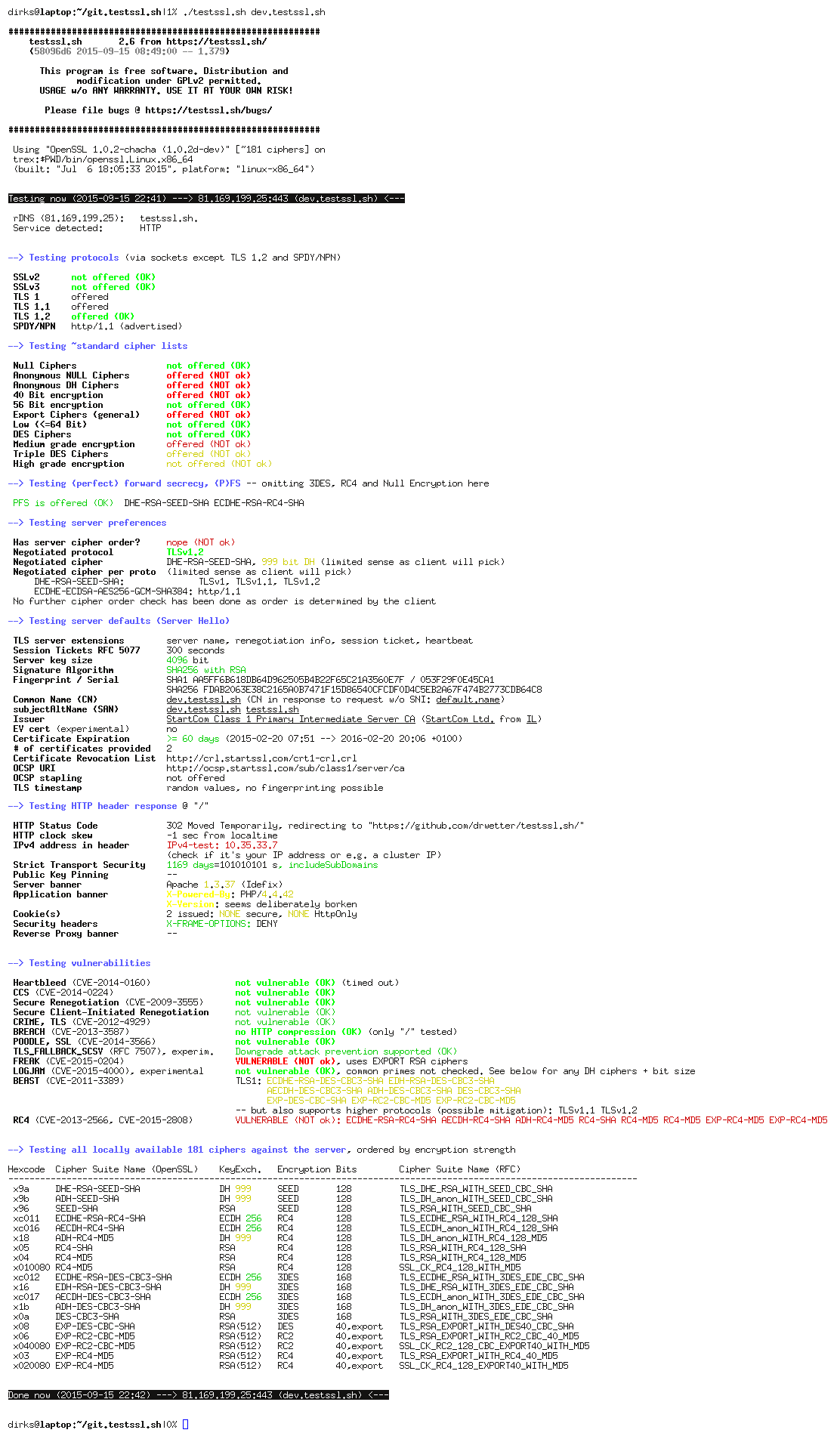
The normal use case is probably just testssl.sh <hostname> , see first picture above.
The second picture with the
dark background shows a run from a FreeBSD 10 machine against a completey broken and not patched Ubuntu 12.04 machine. The features
not available locally on FreeBSD are in magenta, the dangerous ciphers, protocols and vulnerabilities
are in red.
Starting testssl.sh with no params will give you a general idea how to use it:
userid@somehost:~ % testssl.sh

testssl.sh <options>

where <options> is one of

   <-h|--help>                 what you're looking at
   <-b|--banner>               displays banner + version
   <-v|--version>              same as above
   <-V|--local>                pretty print all local ciphers
   <-V|--local> <hexcode>      what cipher is <pattern hexcode>?


testssl.sh <options> URI

   <-e|--each-cipher>          check each local ciphers remotely
   <-E|-ee|--cipher-per-proto> check those per protocol
   <-f|--ciphers>              check cipher suites
   <-p|--protocols>            check TLS/SSL protocols only
   <-P|--preference>           displays the servers picks: protocol+cipher
   <-y|--spdy>                 checks for SPDY/NPN
   <-x|--single-ciphers-test> <pattern>  tests matched <pattern> of cipher
   <-B|--heartbleed>           tests only for heartbleed vulnerability
   <-I|--ccs|--ccs_injection>  tests only for CCS injection vulnerability
   <-R|--renegotiation>        tests only for renegotiation vulnerability
   <-C|--compression|--crime>  tests only for CRIME vulnerability
   <-T|--breach>               tests only for BREACH vulnerability
   <-0|--poodleh>              tests only for POODLE vulnerability
   <-s|--pfs|--fs|--nsa>       checks (perfect) forward secrecy settings
   <-4|--rc4|--appelbaum>      which RC4 ciphers are being offered?
   <-H|--header|--headers>     check for HSTS and server banner string

   <t|--starttls> protocol     does a default run against a STARTTLS enabled service


partly mandatory parameters:

  URI           host|host:port|URL|URL:port   (port 443 is assumed unless otherwise specified)
  pattern       an ignore case word pattern of cipher hexcode or any other string in the name, kx or bits
  protocol      is one of ftp,smtp,pop3,imap,xmpp,telnet (for the latter you need e.g. the supplied openssl)

userid@somehost:~ %
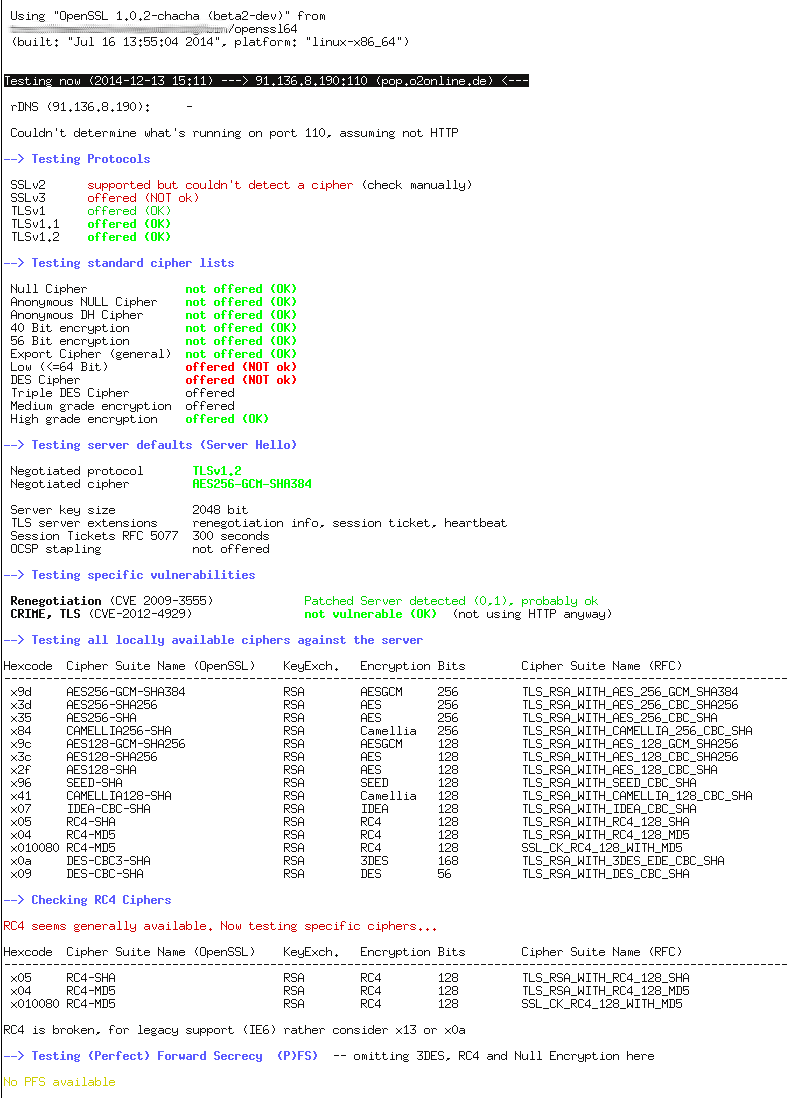
A STARTTLS check (see third picture on the lower left hand side, invoked with
testssl.sh -t pop3 pop.o2online.de:110) would be achieved with e.g.
testssl.sh --starttls smtp <smtphostname>.<tld>:587
testssl.sh -t xmpp <jabberhostname>.<tld>:5222
testssl.sh --starttls pop3 <pophostname>.<tld>:110

As the help says: Currently only one option at a time works. Note that the calling order has changed in 2.2. The second argument now is the protocol!
A neat feature: If you want to find out what local ciphers you have and
print them pretty, use testssl.sh -V. Ever wondered what hexcode a cipher is?
testssl.sh -V 9f lets you search for the hexcode 9f. You can also supply an ignore case
pattern in the output of a single cipher line, e.g. testssl.sh -V CBC puts out
every locally available cipher having the Cipher Block Chaining mode in its name.
If you have the file mapping-rfc.txt in the same directory testssl.sh -V displays the matching RFC style cipher
suite name. Also during every cipher suite test the corresponding RFC style name is
displayed. It's a broad output. If you don't want this, you need to move mapping-rfc.txt
away.
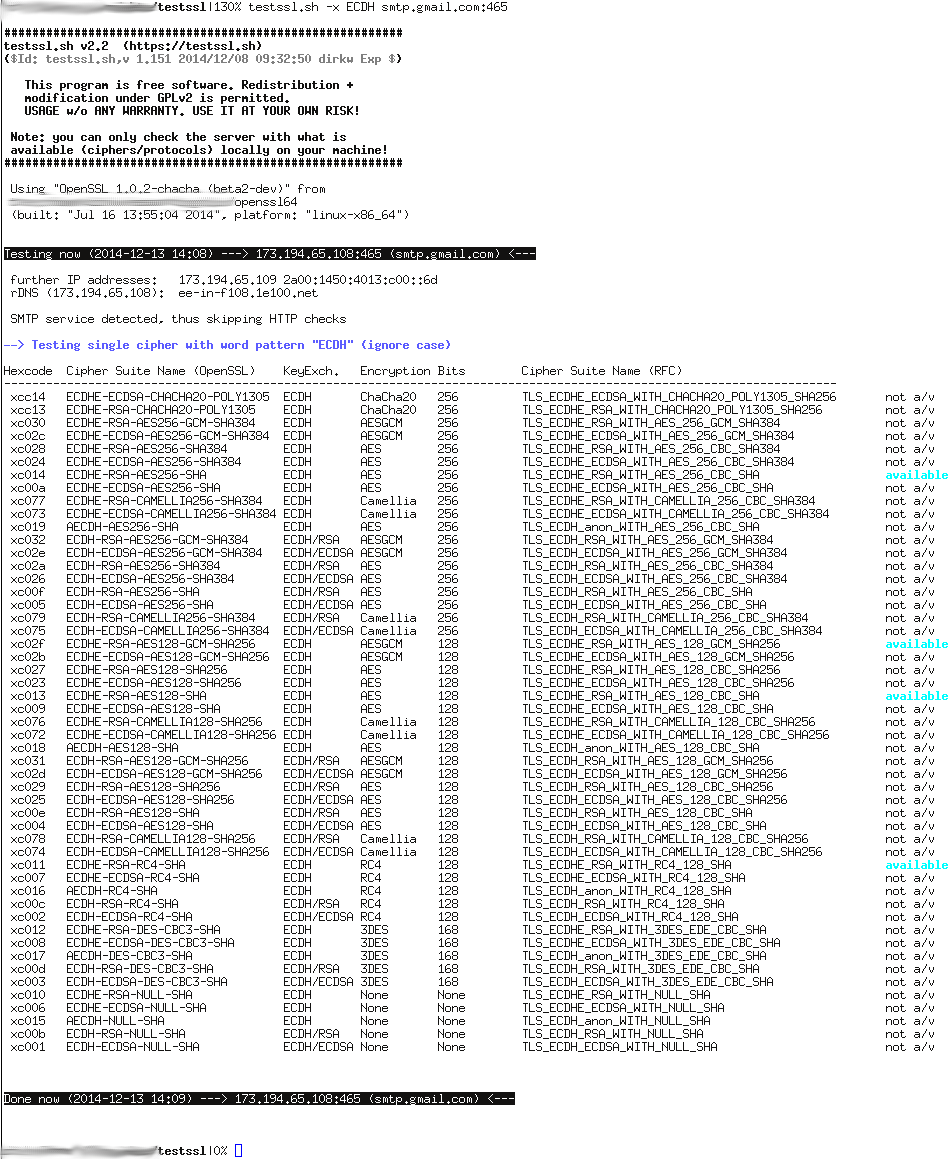
A similar test can be performed with testssl.sh -x <pattern> URL .
Example: testssl.sh -x ECDH google.com checks google.com
for ECDH ciphers (and lists also not available ones at the target),
testssl.sh -x DHE smtp.posteo.de:465 does
a similar thing for the TLS enabled SMTP service – see picture on the lower right hand side.
Got it so far? Good.

Hint regarding OpenSSL binary
As mentioned above, a prerequisite for thoroughly checking SSL/TLS enabled servers is: all you want to check for has to be
available on your client. Transport encryption is not only depending on the server but also on your crypto provider on the client side –
especially if you want to use it for testing.
So there are drawbacks out of the Linux distributions boxes -- so to speak:
- one cannot check 56 Bit ciphers as they are disabled during compile time.
- some ciphers are disabled for security reasons,
- support maybe not included (to disable CRIME)
- SSLv2 is often disabled
- and last but not least: SSLv3 seems to be outphased too
The worst test scenario is using libressl -- as it has lots of stuff disabled.A
The signed tarball provides
specially compiled statically linked (except glibc and the loader)
OpenSSL binaries as a courtesy.
The newer version version also has ChaCha+Poly
ciphers on board. There are also Kerberos binaries included -- the latter ones require a bunch of
libraries (no static binaries). In the end those binaries will give you 191 ciphers as opposed to ~110 from standard Linux
distros!
You'll need to unpack my binaries, dump those you need either in
the same location as testssl.sh , named just openssl
or openssl.`uname -m` . You can also tell testssl.sh
via environment variable where your openssl binary is: export
OPENSSL=<path_to_myopenssl>
before you use testssl. Or issue
OPENSSL=<path_to_myopenssl> testssl.sh <hostname>
Don't try outdated OpenSSL versions before 1.0! Those versions are deprecated, you likely will not get very far.
testssl.sh is not locking those out but things might not work as expected. Support will be retired soon.
If you insist on using crippled binaries, you'll get a warning in magenta, see picture on the right hand side.
Misc
Feedback, bugs and contributions are welcome!
Currently there are two git repos @ github and @ nginx goodies on bitbucket (thx Markus setting the latter up). Here @ https://testssl.sh you will always find the stable version. At the github repo is the latest-greatest devel version.
Mailing list, bug tracker etc. will come soon.
Contact
me via github or send me an e-mail to dirk aet testssl dot sh.
I post all significant updates on Twitter (@drwetter).