


Loading
Listening to FM Radio in Software, Step by Step
Get started in software-defined radio with a project that can tune in two FM stations at once.
My article “GNU Radio: Tools for Exploring the Radio Frequency Spectrum” [LJ, June 2004] provides an overview of how the GNU Radio system works and discusses a couple hardware options for getting the RF signals digitized and into the computer. This article takes a look at how to use GNU Radio to listen to FM radio.
The hardware setup used in this article is shown in Figure 1. It's the brute-force, no-frills approach and is good for explaining how everything works. Later in the article, we discuss the Universal Software Radio Peripheral (USRP) and what it can do for you.
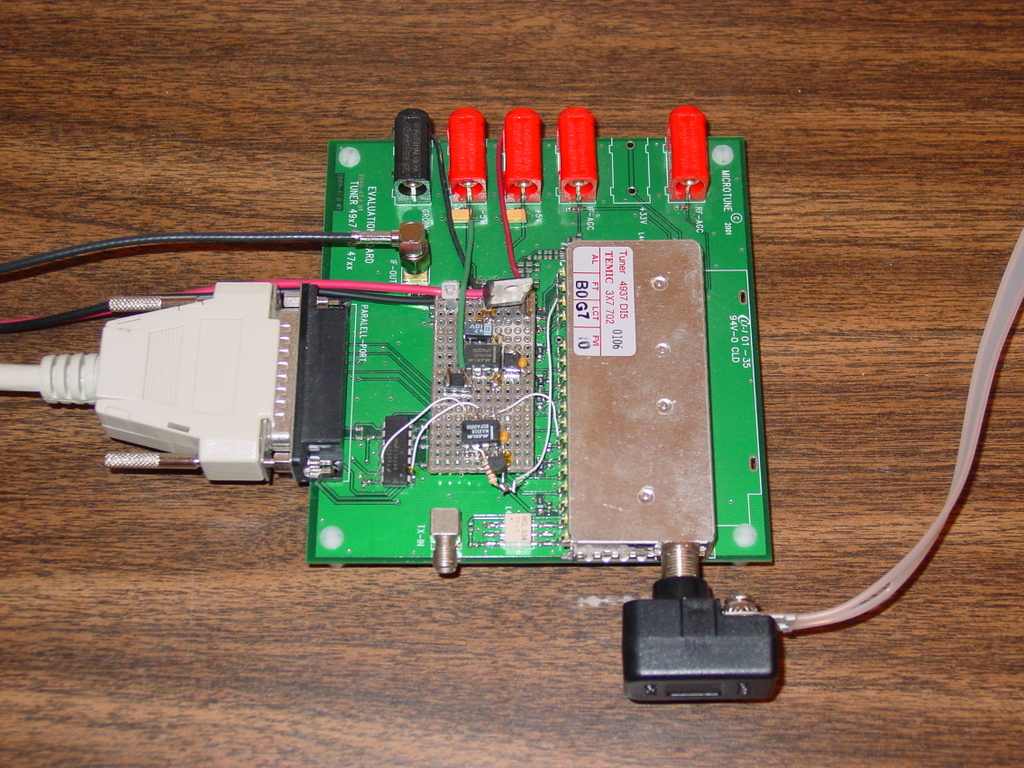
Figure 1. Cable Modem Tuner RF Front End
Our setup consists of a conventional FM dipole antenna, a cable modem tuner module mounted on an evaluation board and a 20M sample/second PCI analog-to-digital converter (ADC) card. The antenna plugs in to the input of the tuner module. The tuner module IF output is connected with a piece of coaxial cable to the ADC input on the back of the computer. The tuner module eval board is connected to the PC's parallel port so that we have a way of controlling the module.
The specific hardware we're using is a Microtune 4937 DI5 3X7702 cable modem tuner module and a Measurement Computing PCI-DAS 4020/12 ADC board. This particular tuner module is hard to get, but others, such as those from Sharp Microelectronics, ought to work fine (see the on-line Resources section).
The cable modem tuner functions as our RF front end and is responsible for translating the radio frequency signals that we're interested in down to a range that our ADC can deal with. In this case, the module translates a selectable 6MHz chunk of the spectrum in the range of 50MHz–800MHz down to a 6MHz chunk centered at 5.75MHz. For more background on these concepts, see the June article mentioned previously.
First off, let's take a look at what happens when we tune our front end to the middle of the FM band, say 100.1MHz. Figure 2 shows the received samples vs. time. This view, the time domain, is what you'd see on an oscilloscope. It's not particularly enlightening, but it does show that our samples are in the range of –170 to –70, which is fine. In an ideal world, they would be symmetric about zero. For our purposes, the offset won't matter.

Figure 2. ADC Samples in the Time Domain
The frequency domain provides additional information. In this case, we grab 1,024 samples at a time and compute the discrete Fourier transform using the fast Fourier transform (FFT) algorithm. This gives us a representation of the frequencies that are contained in the input signal. Figure 3 shows the resulting spectrum. The x-axis is frequency, and the y-axis is power in decibels (10 * log10 power). The low end is at zero Hz, and the top end is at 10MHz, half our sampling rate.
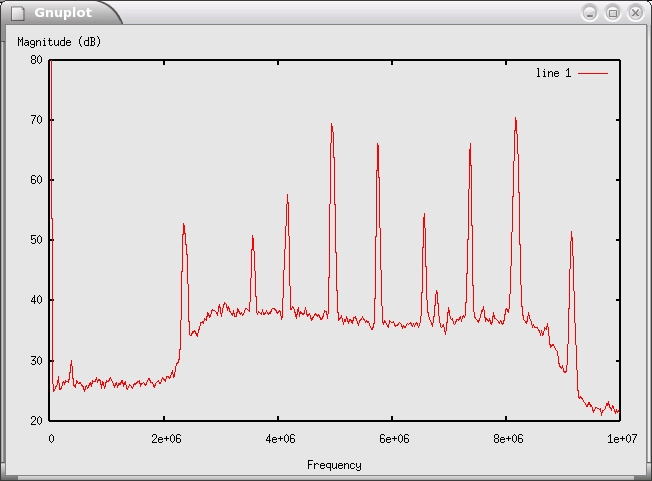
Figure 3. Fast Fourier Transform of FM Band with Nine Stations
Each of the spikes in Figure 3 is a radio station. Our software sees them all at once! To listen to a station, we need a way to separate it from all of the others, translate it to baseband (DC, 0Hz) and reverse the effect of the frequency modulation. We work through this step by step, but first let's talk about FM.
To understand how an FM receiver works, it's helpful to know a bit about how FM signals are generated. With FM, the instantaneous frequency of the transmitted waveform is varied as a function of the input signal. Figure 4 shows m(t), the input signal (the message, music and so forth), and s(t), the resulting modulated output. To be rigorous, the instantaneous frequency at any time is given by the following formula:
f(t) = k*m(t) + fc
m(t) is the input signal, k is a constant that controls the frequency sensitivity and fc is the frequency of the carrier (for example, 100.1MHz). Remember that frequency has units of radians per second. As a result, frequency can be thought of as the rate at which something is rotating. If we integrate frequency, we get phase, or angle. Conversely, differentiating phase with respect to time gives frequency. These are the key insights we use to build the receiver.
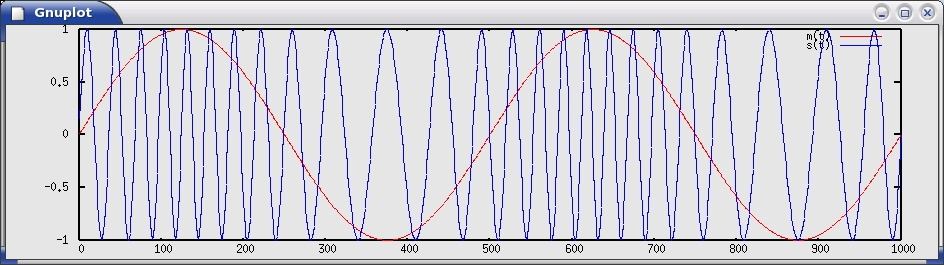
Figure 4. A Simple Frequency Modulated Signal
______________________

Geek Guides
Practical (and free!) books for the most technical people on the planet.
- NEW: Get in the Fast Lane with NVMe
- NEW: Take Control of Growing Redis NoSQL Server Clusters
- Linux in the Time of Malware
- Apache Web Servers and SSL Encryption
- Build a Private Cloud for Less Than $10,000!
Plus many more.
Upcoming Webinar
Getting Started with DevOps - Including New Data on IT Performance from Puppet Labs 2015 State of DevOps Report
August 27, 2015
12:00 PM CDT
DevOps represents a profound change from the way most IT departments have traditionally worked: from siloed teams and high-anxiety releases to everyone collaborating on uneventful and more frequent releases of higher-quality code. It doesn't matter how large or small an organization is, or even whether it's historically slow moving or risk averse — there are ways to adopt DevOps sanely, and get measurable results in just weeks.
Free to Linux Journal readers.
Register Now!- Calling All Linux Nerds!
- The Controversy Behind Canonical's Intellectual Property Policy
- Non-Linux FOSS: Flaky Connection? Mosh it!
- Shashlik - a Tasty New Android Simulator
- Hacking a Safe with Bash
- Huge Package Overhaul for Debian and Ubuntu
- Django Models and Migrations
- LibreOffice 5.0 Looking Good and Shipping This Week
- Three More Lessons
- Upcoming Webinar: Getting Started with DevOps


Comments
@dinesh
and that is why lots of americans don't have jobs, right?
fm demodulation
sir, i need the total detail of fm demodulation which have sdr applications using vhdl domain and also matlab programs and vhdl coding for all about fm demodu.........
fm demodu rceiver circuit diagram also plz send it to my mailid as soon as possible sir
details
I would like to start a New Fm station. can u give the details for what r the software we want to bye
Off-Line station break-out
If the break-down of the signal(s) into multiple stations is too much for your CPU, how about recording a more raw version of the input and then breaking it down into multiple stations at a more leisurely rate, possibly even on more than one computer.
If this seems reasonable, could you give some ideas on where to make these changes?
Thanks